
Table of contents
- — The stack is embarrassingly simple
- — How it actually works
- — Setting it up (one time, 15 minutes)
- — The AI part: Claude Code / Codex on your remote machine
- — Why this actually changes things
- — What about the keyboard situation?
- — The unlock: your machine is always on
- — Set up Tailscale SSH for even cleaner access
- — Level up the terminal experience on phone
- — The full phone-optimized terminal stack
- — The DevEx shift nobody’s talking about
- — The setup at a glance
- — Go try it
Not clickbait.
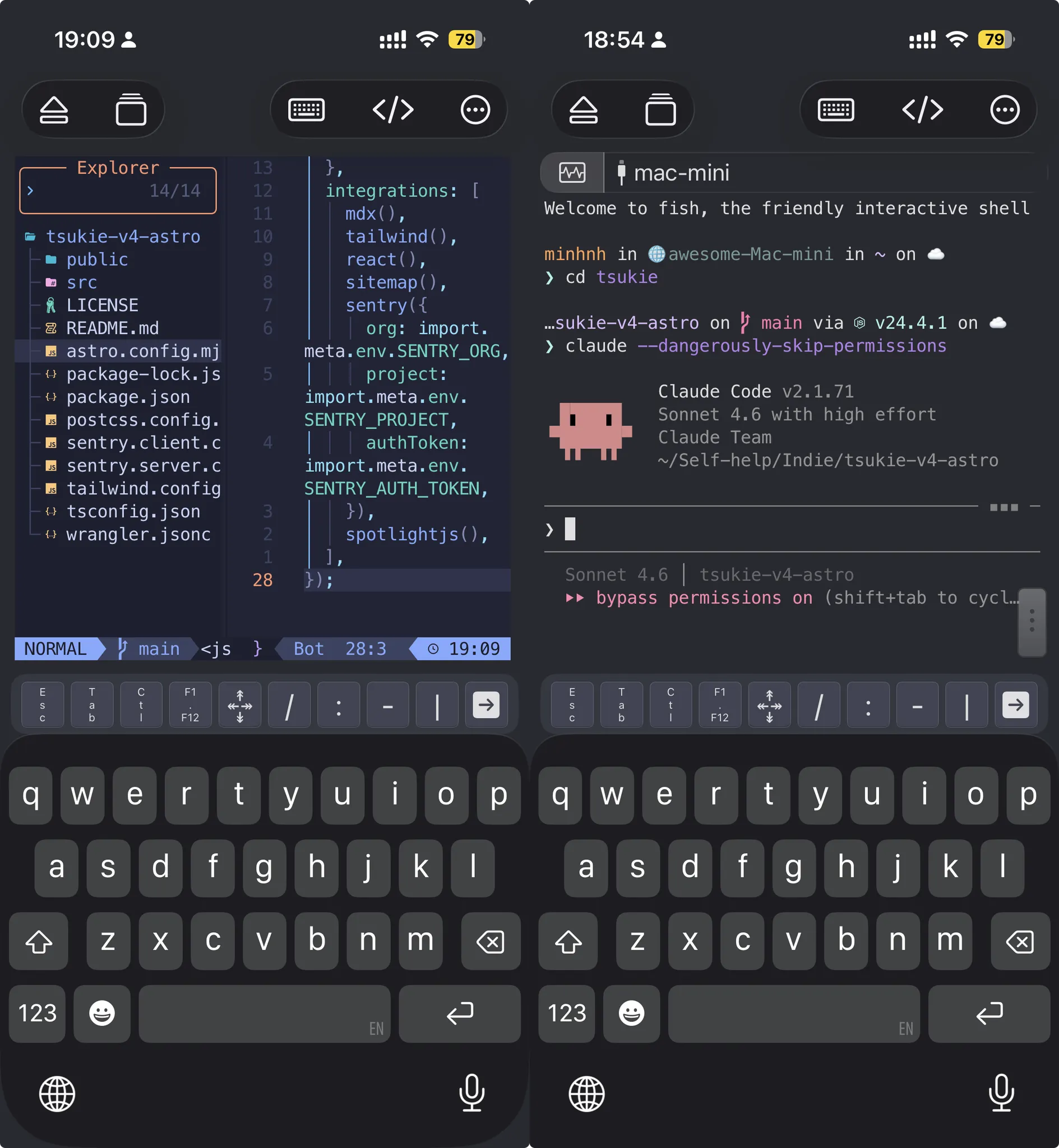
I literally SSH into my Mac Mini from my phone, run Claude Code or Codex in the terminal, preview the app in Safari, and push commits.
From my couch. From the train. From a cafe. Without opening a laptop.
Let me explain how this works and why it fundamentally changes how I think about where and when I work.
The stack is embarrassingly simple
Four tools. That’s it.
- Tailscale — your private network that connects all your devices
- SSH — you probably already know this one
- Claude Code / Codex CLI — your AI pair programmer running on the remote machine
- A remote PC that stays on — Mac Mini, home server, whatever. Just leave it on.
No cloud IDE. No paid remote dev environment. No ngrok hacks. Your machine, your network, your control.
How it actually works
The flow is stupid simple once it’s set up:
iPhone (Tailscale on)
→ SSH into Mac Mini (via Tailscale hostname, no port forwarding needed)
→ start dev server on Mac Mini
→ open Safari on iPhone
→ navigate to http://mac-mini:3000
→ you're hitting your local dev server live
The dev server runs natively on your Mac Mini. You’re not running anything heavy on the phone. The phone is just a terminal + browser combo pointing at the real machine.
Hot reload works. File watching works. Everything works. Because nothing is running on your phone. It’s all on the Mac Mini.
Setting it up (one time, 15 minutes)
Step 1: Enable SSH on your Mac Mini
# via terminal on your Mac:
sudo systemsetup -setremotelogin on
# or: System Settings → General → Sharing → Remote Login → ON
Step 2: Install Tailscale everywhere
- Mac Mini: tailscale.com/download/mac
- iPhone: App Store, search Tailscale
- Sign into the same account on both
Enable MagicDNS in the Tailscale admin panel.
Now your Mac Mini gets a hostname like mac-mini instead of a raw IP.
Step 3: SSH from iPhone
Get an SSH client. Prompt 3 or Termius both work well.
Connect to mac-mini (or 100.x.x.x if you skipped MagicDNS).
ssh yourusername@mac-miniDone. You’re in.
Step 4: Bind your dev server to 0.0.0.0
This is the one gotcha people miss.
Dev servers default to 127.0.0.1 (loopback only). That means only the Mac Mini itself can reach them. You need 0.0.0.0 so Tailscale can route traffic to the port.
# Rails
rails s -b 0.0.0.0

# Next.js
next dev --hostname 0.0.0.0

# Vite
vite --host 0.0.0.0

# or in vite.config.ts:
server: { host: '0.0.0.0' }
Now from iPhone Safari: http://mac-mini:3000 just works.
The AI part: Claude Code / Codex on your remote machine
This is where it gets good.
You’re SSH’d into your Mac Mini. Open a second terminal pane (Termius supports split panes).
One pane: dev server running. Other pane: Claude Code or Codex CLI running.
# in your project folder
claude  # or: codex
You prompt the AI agent. It reads your codebase, writes code, runs commands. All of this happens on your Mac Mini with full CPU and RAM.
Your iPhone is just the interface.
The AI does the heavy lifting on real hardware. You review, direct, and approve from anywhere.
Why this actually changes things
The old mental model: coding requires sitting at a desk, in front of a big screen, with a keyboard, in a focused environment.
The new mental model: coding requires a device that can SSH.
That’s it.
The Mac Mini (or whatever your always-on machine is) is the real computer. The iPhone is just a remote control.
You can:
- review diffs on the train
- spin up a feature while waiting for coffee
- push a fix from the couch without waking up your laptop
- let Claude Code run a long task while you’re away, check in from your phone
This is not a gimmick. I’ve shipped real stuff this way.
What about the keyboard situation?
Real talk: typing long code on iPhone is not great.
But here’s the thing: you’re not really typing code. You’re typing prompts.
“Add rate limiting to this endpoint. Use the existing auth middleware. Keep it clean.”
That’s 15 words. You can type 15 words on a phone.
The AI writes the code. You read it on screen. You approve or redirect.
The input bottleneck moved from syntax to intent. And intent is a sentence, not a file full of boilerplate.
If you really want a keyboard, get a foldable Bluetooth one. MoKo, Logitech Keys-to-Go, whatever. Throw it in your bag. Weight: basically nothing.
The unlock: your machine is always on
The key thing that makes this all work is having a machine that never sleeps.
A Mac Mini on your home network, plugged in, always on. That’s it.
- $600-800 one-time cost (M2 Mac Mini)
- Runs on basically no power (10-30W idle)
- Pays itself off vs any cloud dev environment in months
- You own it, you control it, no subscription
If you already have a self-hosting server (Oracle VPS, home box, whatever) and you’re comfortable with Linux, that works too. Same SSH workflow, just Linux instead of macOS.
Set up Tailscale SSH for even cleaner access
Optional but recommended: use Tailscale’s built-in SSH feature. It replaces traditional SSH auth with your Tailscale identity. No key management. No password prompts.
# run this on your Mac Mini:
tailscale up --ssh

# then from any device on your tailnet:
ssh yourusername@mac-mini   # no key, no password, just works
One less thing to configure. One less thing to break.
Level up the terminal experience on phone
The baseline SSH + AI setup works. But there’s a layer of tooling that makes it genuinely pleasant instead of just functional.
Neovim for manual edits
AI handles 90% of the code. But you’ll still want to make quick surgical edits yourself — fix a typo, tweak a config, review a file before committing.
Nano is fine for one-liners. Vim muscle memory is everywhere. But if you’re spending real time in the terminal, Neovim is worth it.
# install on Mac Mini
brew install neovim

# basic usage
nvim src/app/page.tsx
The real reason Neovim works on phone: everything is keyboard-driven. You’re not clicking around trying to position a cursor with your thumb. You edit faster with fewer keystrokes. gg, G, /searchterm, ci", done. When your wpm is single-digit due to fat-fingering on the phone virtual keyboard, this is godsend.
If you want a full Neovim setup without configuring from scratch, LazyVim gives you a sane default config in one command.
LazyDocker for managing containers
If you’re running local Docker containers (databases, services, dev dependencies), typing docker ps, docker logs -f, docker exec -it ... repeatedly on a phone keyboard is pain.
LazyDocker gives you a TUI dashboard for all of that.
brew install lazydocker

# run it
lazydocker
One screen. All your containers. Live logs. Exec in with a keypress. No retyping container names on a tiny keyboard.
Modern CLI tools that make small screens livable
The modern CLI stack matters more on a phone than a desktop.
Why? Because on a big screen you can afford visual noise. On a phone screen you need signal, fast.
The ones that earn their place most in this workflow:
- lazygit — stage hunks, commit, push, rebase, all in a TUI. Never manually type
git add -pon a phone again. - bat instead of cat — syntax highlighting in a tiny terminal makes code actually readable
- delta as git pager — proper diff view, word-level changes, side by side where possible
- btop — CPU/memory/network at a glance when you want to know if your dev server is melting
- zoxide (z) — jump to any project folder in 2 keystrokes instead of typing full paths
- fzf — fuzzy search files, history, processes. Ctrl-R for shell history alone is worth it on phone
- tldr — when you forget a flag and don’t want to read a man page on a 6-inch screen
# install all at once
brew install lazygit lazydocker neovim bat git-delta btop zoxide fzf tldr
Add to your .zshrc:
eval "$(zoxide init zsh)"
alias cat='bat'
alias docker='lazydocker'
alias lg='lazygit'
Zellij or tmux for persistent sessions
This one is critical and people sleep on it.
When you SSH from your phone, if the connection drops (train goes into a tunnel, phone sleeps, wifi cuts out) — your session dies. Claude Code gets killed mid-task. Dev server goes down.
tmux or Zellij solves this.
They keep your sessions alive on the server even when the SSH connection drops. Reconnect later and everything is exactly where you left it.
brew install zellij   # more modern, better defaults
# or
brew install tmux     # battle-tested, everywhere

# start a persistent session
zellij  # or: tmux new -s dev

# reconnect after disconnect
zellij attach  # or: tmux attach -t dev
Run Claude Code in one pane, dev server in another, lazygit in a third. Drop connection. Reconnect. Nothing died.
This turns a flaky mobile connection from a dealbreaker into a non-issue.
Starship prompt
Small thing but adds up: Starship gives you a fast, informative shell prompt.
Current git branch, node version, exit codes — all visible at a glance. On a small screen where context is limited, a good prompt does real work.
brew install starship
echo 'eval "$(starship init zsh)"' >> ~/.zshrc
The full phone-optimized terminal stack
[SSH session via Termius]
  └── Zellij (persistent session, split panes)
       ├── pane 1: claude / codex (AI agent)
       ├── pane 2: npm run dev --host 0.0.0.0
       ├── pane 3: lazygit (git management)
       └── pane 4: lazydocker (container management)

[when you need to edit manually]
  └── nvim filename

[iPhone Safari]
  └── http://mac-mini:3000 (live preview)
That’s a complete dev environment. No laptop. No big screen. No desk required.
The DevEx shift nobody’s talking about
Everyone’s focused on AI making you write code faster.
The real unlock is AI letting you work from anywhere without losing quality.
Because the bottleneck isn’t your typing speed or your screen size anymore. It’s your ability to direct the system.
And you can direct a system from any device. Any location. Any posture.
Couch dev is now legitimate dev. Train dev is now legitimate dev.
Your Mac Mini doesn’t know what posture you’re in. It just runs the code.
The setup at a glance
[iPhone]
  Termius (SSH terminal)
    → Zellij session (persistent, survives disconnects)
       ├── claude --dangerously-skip-permissions
       ├── npm run dev --host 0.0.0.0
       ├── lazygit
       └── lazydocker

[iPhone Safari]
  → http://mac-mini:3000
  → live preview, hot reload, everything works
That’s the whole setup.
Go try it
- Install Tailscale on your Mac/PC and phone
- Enable SSH on your machine
- Get Termius on iPhone
- SSH in
- Start your dev server with
--host 0.0.0.0 - Open it in Safari
Takes 20 minutes to set up once. Changes how you think about work permanently.